Pipeline mappings and transfer settings
Pipeline mappings and transfer settings
A pipeline's Settings define the storage locations to use and how to process their objects. A scheduled run uses the settings saved for that pipeline.
Open Pipelines and click Settings on the pipeline's card. On the new pipeline page, click Edit in the Settings card.
Mappings
Each mapping pairs a source with a destination:
From: source storage account, bucket or container, and an optional object key prefix.
To: destination storage account, bucket or container, and an optional object key prefix.
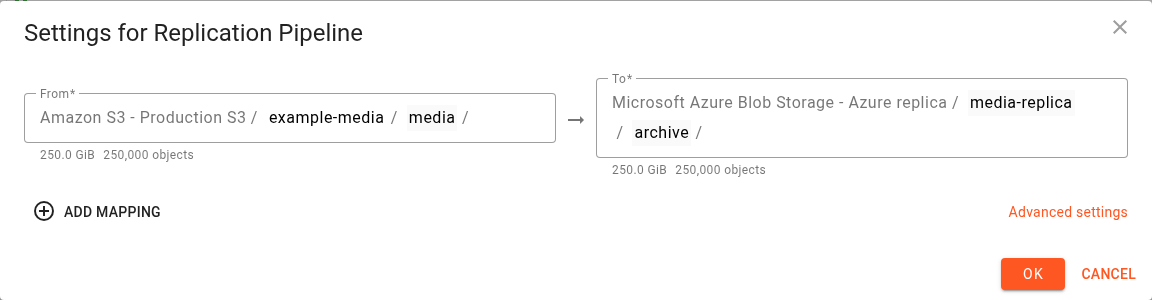
Select an existing destination, or specify a new destination bucket or container where supported. Creating a destination requires the appropriate storage permissions and may require a region.
Click Add mapping to add another pair. Use the remove icon beside a mapping to remove it from the configuration. The number of mappings is subject to your account's limits.
Prefix example
Suppose the source is example-media/media/ and the destination is media-replica/archive/.
Source object key | Destination object key |
|---|---|
|
|
|
|
The source prefix selects the objects and is removed from their destination keys. The destination prefix is added to the remaining key. Objects outside the source prefix are outside this mapping.
An empty source prefix selects the whole source bucket or container. An empty destination prefix writes the remaining object keys at the destination root.
See Mappings and prefixes for additional mapping examples.
Advanced settings
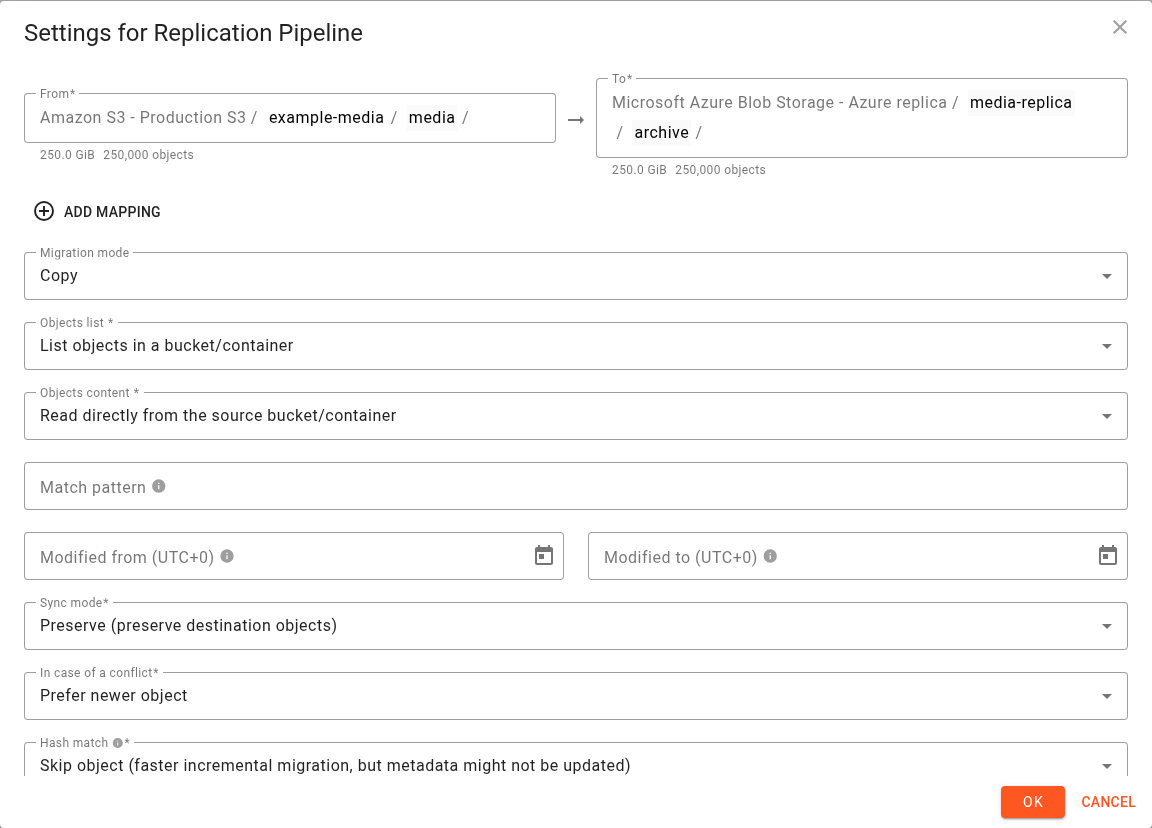
Click Advanced settings to display the transfer options. The available controls depend on the providers, account permissions, and whether the pipeline is continuous.
Copying, moving, and deletions
Migration mode controls what happens to source objects:
Mode | Behaviour |
|---|---|
Copy | Copy objects while keeping the source objects. |
Move | Delete successfully migrated objects from the source. |
Use Copy to maintain a replica while continuing to use the source.
Sync mode controls destination deletion behaviour:
Sync mode | Scheduled pipelines | Continuous pipelines |
|---|---|---|
Preserve (preserve destination objects) | Keep destination objects that are absent from the source. | Do not propagate source deletion events. |
Delete (propagate deletes) | Remove destination objects that are absent from the source within the configured mapping's scope. | Include source deletion events in replication. |
Delete can remove destination data. Review your mappings, prefixes, and filters before enabling it. For example, Copy + Delete can maintain a destination replica without deleting objects from the source as part of copying them.
Conflicts and repeated runs
In case of a conflict controls how an object is handled when its destination key already exists:
Choice | Behaviour |
|---|---|
Prefer source object | Use the source object when processing a conflict. |
Prefer destination object | Keep the existing destination object. This option is unavailable with Delete sync mode. |
Prefer newer object | Use modification times to decide which object to keep. This option is unavailable for continuous pipelines. |
Hash match controls whether an otherwise eligible object is skipped when its content hash matches the destination. Skipping can reduce repeated transfers, but metadata changes may not be applied. Overwrite anyway allows the transfer even when hashes match.
For scheduled pipelines, Comparison method controls whether destination objects are checked through individual probes, listings, or a combination. Auto lets Flexify.IO select the method. Continuous pipelines use Probe destination.
Selecting objects and their content
Setting | Purpose |
|---|---|
Objects list | List objects in the source bucket or container, or take object keys from a file. File-based lists have restrictions, including use with multiple mappings and Delete sync mode. |
Objects content | Read object contents directly from storage or through a configured CDN URL where supported. |
Match pattern | Select object keys using a wildcard or regular expression. |
Modified from / Modified to | Restrict processing by object modification time. These filters are unavailable for continuous pipelines. |
Other transfer settings
The settings editor also provides the following options where supported:
Group | What you can control |
|---|---|
Metadata | Destination object timestamps and removal of selected HTTP headers. |
Archived objects | Whether to skip archived objects or request restoration, with restoration tier, duration, and size limits. Automatic restoration is unavailable for continuous pipelines. |
Integrity | Whether to require strict consistency checks. |
Parallelism | Engine count, slots, and streams used to transfer objects. |
Rate limits | Transfer bandwidth and request rate. |
Multipart uploads | Upload threshold, part size, and parallel streams per object. |
Retries | Retry counts and retry timing. |
Engine selection | Which available engines or locations run the work. Available choices depend on account permissions. Continuous pipelines use existing engine capacity rather than automatic deployment. |
Diagnostics | Log level and migration report detail, if permitted for your account. |
Dry run | Evaluate a transfer without applying its object changes. Clear this setting when you want subsequent runs to transfer data. |
See Advanced settings and Metadata for the shared migration settings. Continuous pipeline restrictions are listed in Continuous replication pipelines.
Save changes
Click OK to validate and save the settings. Resolve any validation errors before continuing.
Changes to a scheduled pipeline configure subsequent runs. An active run has its own migration configuration. Changing a continuous pipeline's settings reconfigures its event processing and restarts its replication work; review Continuous pipeline notification configurations before changing source mappings.