Adding a storage account
The first step is to add one more storage accounts to Flexify.IO. Adding a storage account allows Flexify.IO to access data in your cloud storage providers, such as Amazon S3 or Azure Blob Storage, or in out private on-premises storage system.
Adding a storage account connects Flexify.IO to existing storage. Your data stays in that storage until you configure an operation that copies, moves, or changes it.
Adding new storage account to Flexify.IO
Open the Data tab in the Flexify.IO Management Console and click Add Storage Account.
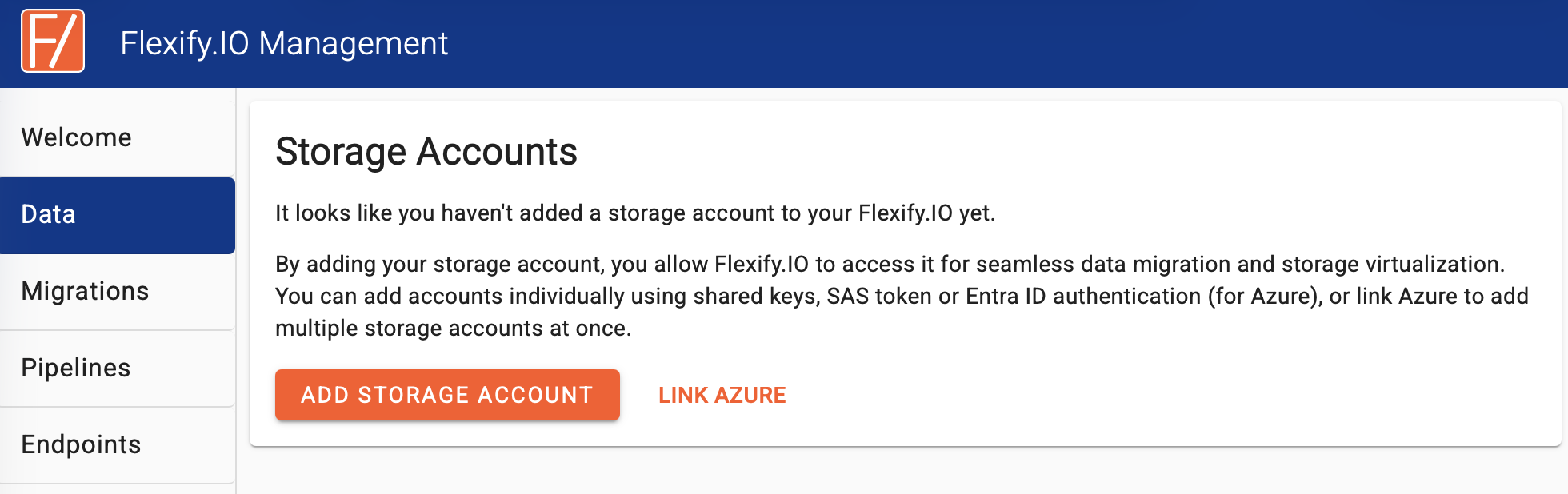
For Azure Storage, consider using Link Azure to select and add multiple storage accounts with Entra ID RBAC authentication.
Select your storage provider and enter the required connection details. Depending on the provider and authentication method, these may include:
Access key ID and Secret access key for S3-compatible providers.
Azure storage account name and an Account key or SAS token.
Microsoft Entra ID authentication for Azure.
A custom endpoint address and region.
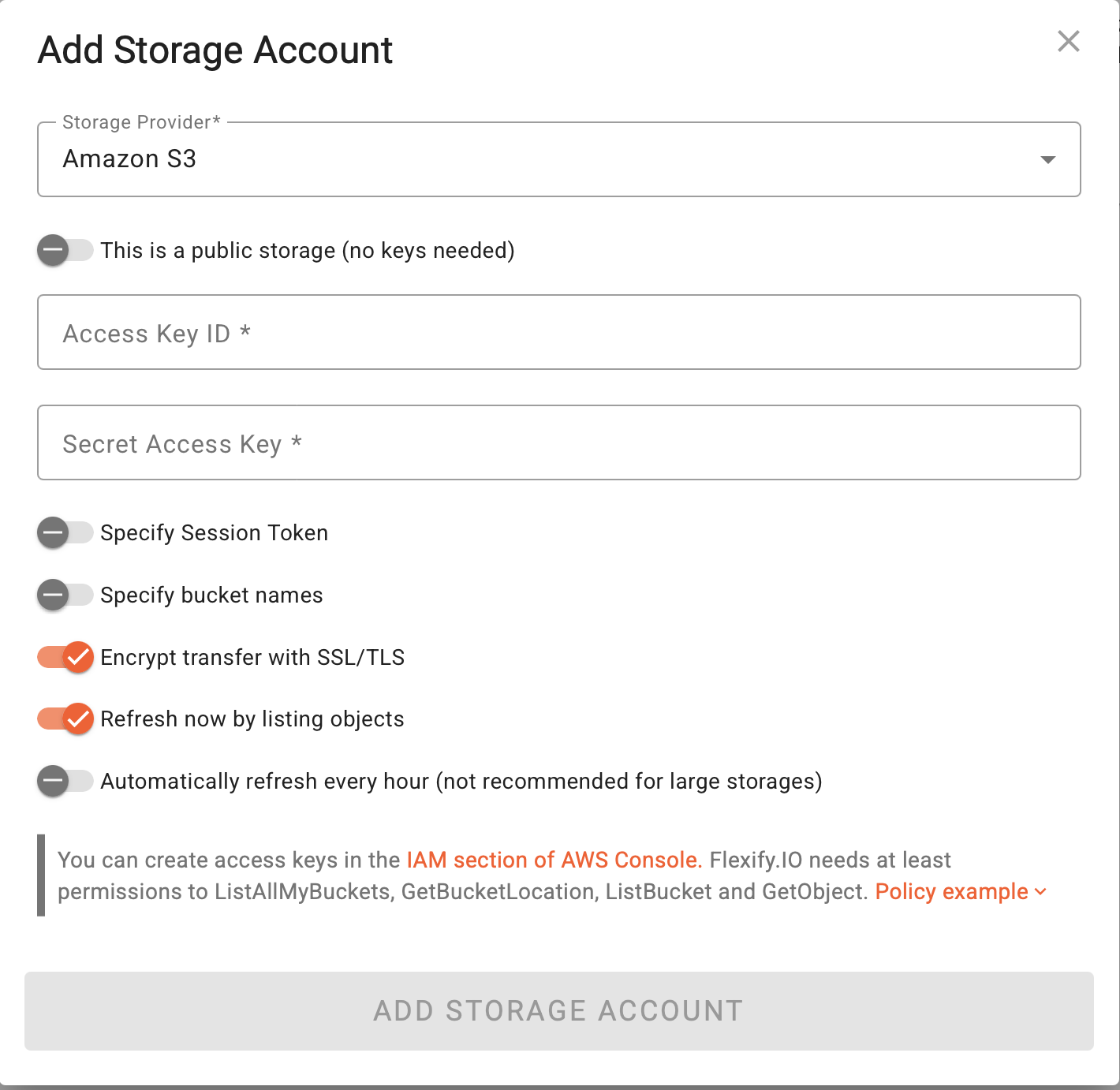
You can let Flexify.IO list buckets or containers, or manually specify their names by checking the Specify bucket names checkbox.
If your storage provider is not in the list, try adding as Other or contact us to request adding your provider to the list.
The credentials must allow the operations you intend to perform. For example, copying data requires access to list and read source objects and write destination objects. Moving data also requires permission to delete source objects.
Region and Endpoint
Some storage providers require selection of specific region such as us-east-2, eu-west-2, or ap-southeast-5.
Some storage providers allow specifying custom endpoint URL, which is compulsory for storage providers that do not provide a common endpoint URL for all users.
Specifying bucket names
Your storage account credentials may not allow listing buckets, or you may want to add only relevant buckets and exclude all other buckets.
Set the Specify bucket names checkbox to specify bucket names manually and disable automatic buckets listing.
Listing objects
The Refresh now by listing objects option allows Flexify.IO to calculate buckets statistics such as total size and number of objects by listing all object in the bucket. If there are billions of objects in the bucket, this may result in millions of ListObjects requests and could be expensive.
Similarly, enabling Automatically refresh every hour, even on smaller buckets, can soon add up to a significant cost.
Encryption
The Encrypt transfer with SSL/TLS checkbox forces encryption in transit. Uncheck this checkbox if your storage provider does not support HTTPS or is configured with incorrect, invalid or untrusted SSL certificate.
Disabling SSL/TLS encryption can also improve migration or virtual endpoint throughput because Flexify.IO no longer needs to spend CPU time encrypting and decrypting data on connections to the storage account.
Public storage accounts
Public storage accounts can be accessed without authentication. To add a public storage account, check the This is public storage checkbox and do not enter storage credentials.
You must specify bucket name or names when adding a public storage account.
Verification
When you add a storage account, Flexify.IO verifies connection details by performing ListObjects or HeadBucket operation.
In the event that verification failed, usually due to incorrect keys or insufficient permissions, you are offered an option to skip validation. A new Skip validation (add anyway) checkbox appears, and setting this checkbox allows bypassing validation.
Some checks, such as validating key and URL formats, are always enforced to help prevent certain attack vectors and cannot be bypassed.
Next Steps
Start data migration between storage accounts' buckets.
Configure scheduled or event-based synchronization pipeline to move or replicate data between buckets or storage accounts.
Configure virtual endpoint with Azure Blob Storage account to translate S3 requests to Azure Blob API or with multiple storage accounts to split or replicate data across multiple buckets.